
grep in Haskell
In-between my “assignments” I’ve been reading more about Haskell and doing various exercises. Here are some notable things worth mentioning about this peculiar programming language:
- Types are used sparsely and needed rarely. Haskell mostly looks like a dynamically typed language. But it is not. Haskell is strongly, statically typed. The compiler figures out the types automagically. You could compare this to C++ templates, where you need or want to specify concrete types rarely. From this perspective, writing in Haskell is like hardcore template meta-programming.
- Lists are a basic structured type in Haskell. Just like std::vector is the most important container type in C++. However lists in Haskell are more pervasive.
- Recursion is probably as much pervasive in Haskell as lists. In fact, all list processing is done by the means of recursion! There is an operator for indexing lists, but underneath it seems to be retrieving elements using recursion.
- Haskell is a lazy language. The code is not resolved until it is actually needed. Therefore code which looks like processing huge lists, e.g. reading huge files into memory, may not be using too much memory, since it is executed lazily. Also, infinite lists are possible in Haskell thanks to this.
- The compiler seems to be doing a reasonable job at optimizing the code. This is hearsay on my end, I haven’t done any comparisons myself.
grep
My next assignment was to write a simple grep-like program. So, input coming from files or stdin is filtered line-by-line with a regular expression.
A lot of reading and searching went in this direction. I have seen lots of similar code. In fact there are many, many ways to implement this in Haskell.
Here is what I came up with:
import System.Environment -- for getArgs
import Text.Regex.Posix   -- for regular expressions

main                           = getArgs >>= mainWithArgs

mainWithArgs []                = usage
mainWithArgs ["-h"]            = usage
mainWithArgs [regex]           = processStdin $ grepContents regex
mainWithArgs (regex:filenames) = mapM_ (processFile $ grepContents regex) filenames

usage                          = putStrLn $ "Usage: grep regex [file...]"

processFile func filename      = readFile filename >>= processContents func

processStdin func              = getContents >>= processContents func

processContents func contents  = putStr $ func contents

grepContents regex             = unlines . filter (grepLine regex) . lines

grepLine regex line            = line =~ regex
There are several things here worth noting.
The code is quite Haskellesque. There are no loops. There are no conditional expressions. Except for a minimal use of Monads, it’s pure functional programming.
Lines 1 and 2 import modules for a few things which we need in this program.
Line 4 contains the actual main computation. The main computation retrieves the list of program arguments and passes them to mainWithArgs computation. The >>= operator is used to chain computations, the output of the preceding computation is fed as an argument to the computation coming after it.
One thing crucial for understanding – and at the same time quite difficult to grasp for new Haskel programmers – is the difference between computations and functions. Functions are pure, which means that when invoked with specific arguments, they always return the same value. Such idealistic approach to programming is not sustainable in real world programs. To solve this, Haskell has monads. I don’t understand the difference between a monad and a computation nor I know whether there is any difference between them yet. But monadic computations do not always return the same result, even when given the same input.
Because Haskell has this distinction between functions and computations, different types and operators are used to denote operations when monads are involved. This is also why mainWithArgs cannot be invoked like this:
main = mainWithArgs ( getArgs ) -- Invalid! These are not functions!
Back to the grep program. The mainWithArgs computation is implemented four times. But each implementation takes different arguments. This is very similar to overloading in C++. But notice that the selection of the overloaded computation will occur in run time! It depends on which arguments are used on the command line. Lines 6, 7: If the user invokes the program with no arguments, or with a single -h argument, the usage computation will be invoked. Line 8: If a single argument is passed, it is treated as a regular expression, and the input is taken from stdin. Line 9: Last but not least, if there are more arguments, the first one is treated as a regular expression and the rest are file names of files to be grepped.
mapM_ in line 9 is similar to map, except it works with computations instead of functions. We could not use map here, because we’re dealing with the IO monad.
In lines 8 and 9 we’re passing a function grepContents regex to be executed on contents. But on line 19 you can notice, that it’s really a concatenation of functions. There are no real arguments passed in it. In Haskell you can chain and pass functions around.
You can also pass incomplete list of arguments to a function and thus create a new function. In line 19 we are doing exactly that with the function grepLine. The grepLine function has two arguments, but we’re passing only one. The result is another function, which can be invoked on a String.
Last but not least, in line 20 we’re using the =~ operator which applies a regular expression to a string. The result may vary, but somehow Haskell figures out that we want the Bool result here.
I originally had type signatures for each function, but I removed them to make the code more concise. Normally type signatures provide additional check to validate the code.
One more thing to notice: the program is written with the most general computations on the top and the details on the bottom. This is not typically seen in statically typed languages, but it helps to read and understand the program.
Let’s be clear. It is mind-boggling. I am still trying to wrap my head around many aspects. Also, there are many new types of expressions in Haskell and many expressions from traditional languages are missing.
My adventure continues…
Basic input and output
Day 2
It’s been an uphill battle. I’m actually surprised I got where I am!
My second program’s purpose is to retrieve two numbers from the command line, assume they are the shorter edges of a right triangle and compute the longest edge.
The “Hello, World!” program evolved only slightly, but it took a long time to arrive at this:
main = do
    putStrLn "Please enter edge A:"
    sa <- getLine
    let a = read sa

    putStrLn "Please enter edge B:"
    sb <- getLine
    let b = read sb

    let c = sqrt $ a^2 + b^2
    putStrLn ""
    putStrLn $ "A = " ++ show(a) ++ ", B = " ++ show(b) ++ ", C = " ++ show(c)
The first thing to notice here is that in line 3 we are creating a local variable sa and assigning the output of getLine to it. The return value of getLine is an IO monad, this is why we can’t just assign it, we have to use the <- operator. I don’t understand monads yet, so let’s assume they are something different from regular functions. The back story of this is that probably the whole expression has some special meaning.
Another fact about it is that the do expression, which is the entire main function, is also a monad (whatever that means).
The most difficult thing to get to work was to actually treat the value received from getLine as a number, because normally it returns a string. The thing did not want to compile no matter what! After a lot of searching I learned that local variables can be assigned/created with let, which in this case is a special, simplified version of the let statement, which works inside the do statements. The other thing is that read can be used like a function, which wasn’t apparent at first.
In other words, read turns a string into another value (like a number), and show turns any value into a string.
Helper function
The next thing I noticed was that there is some boiler plate code here. In particular we are repeating the following pattern twice: printing a prompt, reading a line from stdin and converting the read string into a usable value.
Again, an uphill battle to extract this into a function. And again it didn’t want to compile. The errors were suggesting something about the types, but heck, I wished I understood what it wanted from me! So I left it and returned the next day to arrive at this:
getData :: String -> IO Double
getData prompt = do
    putStrLn prompt
    val <- getLine
    return (read val)

main = do
    a <- getData "Please enter edge A:"
    b <- getData "Please enter edge B:"
    let c = sqrt $ a^2 + b^2
    putStrLn ""
    putStrLn $ "A = " ++ show(a) ++ ", B = " ++ show(b) ++ ", C = " ++ show(c)
The first line describes the types of the function defined in line two. It’s optional and can be deleted without consequences, but in this case it enforces that there is one argument of type String and the return type is Double. There is a monad involved, too, but I don’t understand yet how it’s linked with the main function.
The dollar sign in lines 10 and 12 changes the order of evaluation from its position to the end of the line, making the rest of the line form a single argument to the function. I could have used parentheses instead.
The ++ operator in line 12 concatenates strings.
Impressions
I began to wonder if it will continue to be an uphill battle and when it will become easier. I also started feeling a little bit like fighting PERL for a moment, I hope that feeling won’t persist…
Haskell is difficult. I am not sure yet whether it impacts its usability. We will see.
Hello, World!
For some time now I’ve been planning to learn Haskell. Haskell is a modern functional programming language. The fact is that many other modern languages are constantly acquiring new features from Haskell, such as lambdas, coroutines, list comprehensions, etc. If you look at JS 1.8, Python 3 or C++11, they have more and more features which come from Haskell.
Learning new programming languages is a good way for a programmer to improve his skills. Haskell in particular requires a specific approach to programming, different from the languages most programmers use every day.
One thing, which is encouraging to me, is that you can compile Haskell programs into real executables and run them on bare metal, without any VMs, interpreters and other junk.
There is an obstacle, however. Haskell is scary, complex and difficult to learn. Even though its syntax is quite terse and there is very little boilerplate code in programs written in Haskell, it still has a steep learning curve. If you don’t know Haskell, a program written in this language may seem incomprehensible. This reminds me a lot of PERL, which I have a personal aversion to.
Python is trivial, you can learn it overnight by just reading the online tutorial and you can master it within a week. But Haskell? Forget about it. After one evening of reading my head swelled and at the end of an interactive tutorial I forgot half of the things I’ve learnt!
I’ve decided to take a different approach: to learn the language by combining reading a tutorial and simultaneously set some goals and achieve them by writing more and more complex programs which will do concrete things. I generally hate raw material and hands on experience is the best way for me to learn.
The Haskell Wikibook, which a friend recommended to me, is probably a good place to start. I also have upgraded the installation of Haskell Platform (I’ve had some older version installed for some time).
So for a start, after some basic reading to refresh what I’ve previously learnt and after looking here and there, I’ve managed to write a simple “Hello, World!” program:
main = print "Hello, World!"
I saved this in a file called test.hs. From there there are two options, either compile it like this: ghc -o test test.hs or to run it directly like this: runhaskell test.hs. However the output is not satisfactory:
$ runhaskell test.hs
"Hello, World!"
In particular I don’t want the double quotes. A quick Google search brought me down to this:
main = putStrLn "Hello, World!"
This achieves exactly what I wanted. Unfortunately putStrLn is more difficult to remember than print. After some practice I will probably remember it though.
I’ve also managed to print two strings, although it wasn’t trivial and involved using a do expression:
main = do
    putStrLn "Hello, World!"
    putStrLn "Hello, programmer!"
As you would expect, this is what I get:
$ runhaskell test.hs
Hello, World!
Hello, programmer!
So here is some recap:
- The program has one function, main. This is the function which is executed to run the program. This is similar to C, Python and many other languages.
- It’s trivial to write the above function. It has no arguments and the return value is implicit (no return value in fact). The function declaration couldn’t be more trivial: functionName = functionBody
- putStrLn (or print) is the function I use to print a string, i.e. to write it to standard output.
- I don’t have to use parentheses when invoking putStrLn. In fact everything until the end of line is treated as arguments for that function. If I wanted to do something more complex, I would have to use parentheses to tell the compiler where the arguments end. Another way is to use the $ operator, which I haven’t fully figured out yet.
- The do expression lets me do several things, otherwise I would be limited to a single expression.
- Similarly to Python, there are no semicolons needed. Haskell uses indentation to figure out what belongs where, just like Python. I could use semicolons if I wanted to put both putStrLn functions on one line though, like in Python.
One thing I’ve found out is that WordPress doesn’t color Haskell syntax, so my Haskell programs will be uncolored, sorry!
If you have ideas what I should do next, please let me know. I’m planning to do some string and/or list manipulation, together with maybe input and output formatting.
Boilerplate
Programming languages have different levels of verbosity. Some languages have terse syntax, so you need less text to express what you want the computer to do. Others require you to repeatedly type elaborate constructs, often multiple times, to achieve the same.
Usually you don’t have a choice of programming language. You are hired by a company who already has some existing code and you have to work with that code base. Or you are targeting a specific platform and you have no choice, but to use a particular language.
Regardless of the language you use, you still have to make many choices when designing the software you write, and the choices you make will contribute to the size of the source code and may indirectly affect maintainability, extensibility and robustness.
So what makes a program a good program? I have one theory.
Copy&paste
They don’t teach how to write good programs in schools. In most schools they only teach you the mechanics of programing: they show you the tools, but they don’t teach you how to use them effectively.
My programming adventure started in high school with Turbo Pascal. One of my first projects was a simple game. One time I found a bug and I realized, that I have already fixed it once in another function. I noticed that both pieces of code which had the bug were originally copied from another function.
This was one of my first lessons, and as a programmer you never stop learning. The lesson learnt was that copy&paste approach to programming is a bad practice. If you had to modify one piece of a copied code for whatever reason, you likely have to modify all of them – that’s a lot of unnecessary manual labor, which is something programmers hate. If you just wrote a new expression, which looks similar to or exactly like an existing piece of code, you should instead put it in a new function and call it in both places.
Summary: copy&paste == bad programming practice.
Beyond copy&paste
Not too long ago I’ve been reading some articles criticizing C++, the language I use the most. One of the rightful points was that C++ needs you to type the same code at least twice in more than one place. A typical location of duplicate code is class definitions. First you define a class in a header file, so you type the function declarations there, then you type exactly the same function signatures in a source file where you define the functions.
class Vehicle {
public:
    void StartMotor();
    void Accelerate(double acc);
};

void Vehicle::StartMotor() // you had to type this again!
{
    :::
}

void Vehicle::Accelerate(double acc) // and this too!
{
    :::
}
If you later need to modify a function, e.g. change the number of arguments or their types, you have to do it at least twice. It is actually even worse if you have a derived class and you overload virtual functions. To change the interface, you have to change it in 2*C places, where C is the number of classes which declare that function.
Yet worse, it may happen that you change the function’s signature in the derived class, but forget to change it in the base class. In result, you will have a bug in your program. If you use a pointer to the base class to call the function, the function from the derived class will not be called, since it has a different signature. Fortunately modern compilers issue a warning when this happens, but you still have to write the same piece of code twice.
Sounds like copy&paste? Well, that’s how I write new classes in C++, I define class’ functions in a header file, then copy them to a source file, then use a macro in my editor to expand them by removing semicolons and adding braces on new lines.
Boilerplate code
Welcome to boilerplate code. The definition of boilerplate code is exactly that: redundant code, which you have to write to make a well-formed program source code, but which is unnecessary from your perspective as a programmer.
But the definition of boilerplate code extends beyond what you actually have to write to make a well-formed program. Consider a C++ program where you use a well-known libpng library to load a PNG image. In the basic version, you could write a single function like this:
bool LoadPng(const char* filename, std::vector< char>* image)
{
    :::
}
Inside the function you call the PNG library, which has the C interface, to verify whether the file exists, is a PNG, you load the headers, determine dimensions of the image and color format, and finally you load the image data. Without going into the details, here is how a piece of that function could look like:
bool LoadPng(const char* filename, std::vector< char>* image)
{
    :::

    png_structp png_ptr = png_create_read_struct(PNG_LIBPNG_VER_STRING, NULL, NULL, NULL);
    if (!png_ptr)
    {
        printf("Failed to create png structure\n");
        return false;
    }

    png_infop info_ptr = png_create_info_struct(png_ptr);
    if (!info_ptr)
    {
        printf("Failed to create png info structure\n");
        png_destroy_read_struct(&png_ptr, (png_infopp)NULL, (png_infopp)NULL);
        return false;
    }

    :::
}
This is maybe 10% of the code you have to write to load a PNG file. There are only two lines of code above, which actually do something potentially useful or necessary. The rest of the lines are boilerplate code.
Especially please notice that every time an error can potentially occur, you have to handle it. So you have to write error handling code many, many times. If an error occurs later in the function, you will have to delete the allocated data structures before returning from the function, and you have to write exactly the same code many times, once for every function which could fail.
I bet that there are many programs out there, which have a bug in their PNG loading code and don’t handle the error conditions fully correctly. So in some circumstances these programs will leak memory or behave unpredictably.
Now, the situation above can be improved by writing a C++ wrapper class for loading PNG. But I wouldn’t go too far with it, or we will just shift the boilerplate code elsewhere, instead of reducing it.
I can imagine somebody writing a PNG loader class, and declaring one function of the class per function of the libpng library. Such PNG loader class would simply build a C++ interface over the library’s C interface. That approach may be appealing to some, but the problem is that 90% of that class will be… boilerplate code! There will only be one single place in the whole program where this class would be used – the LoadPng() function. So all that code would be written in vain and only be a maintenance chore, plus a potential place for bugs to hide. Moreover, the compiler would generate much more unnecessary code, contributing to the program’s final size.
class PNGLoader {
public:
    PNGLoader();
    ~PNGLoader();
    static bool SigCmp(...);
    void CreateReadStruct(...); // throw on error
    void CreateInfoStruct(...); // throw on error
    :::
    void ReadImage(...); // throw on error
};
A fact of life is that many programmers call the above approach a “design”. They create beautiful class designs and hierarchies, which are only taking space and engineering time, but contribute little to the program.
And if you happen to be a C++ hater, please know that the above problem affects not only object-oriented languages, but all programming languages in general. Programmers often tend to put too much work and thought into the form instead of focusing on the contents.
So it seems to me that the best approach is to preserve a balance between the amount of code and functionality. Sure, you can write a beautiful command line argument parser, but what good is it if your program only handles two arguments anyway? Handle them correctly, but avoid too much boilerplate code which you will never use.
In case of the PNG loader, a good choice is a function like LoadPng(), which inside uses something like Boost.ScopeExit to handle errors and corner cases. Boost.ScopeExit is actually a good way of safely handling many kinds of resources in C++.
Quality
In general, programs in source code form consist of:
- Comments and whitespaces, generally harmless if used wisely and not to comment out dead code,
- Data structures, describing the internal state of the program,
- Algorithms, which are mathematical transformations of the program state, and last but not least:
- Boilerplate code, which clutters the programs, makes them harder to understand, hides bugs and generally causes programs to be big and slow.
To write good programs, avoid boilerplate code like the plague. It’s not the only rule for writing good programs, but I think it’s an important one.
Advertisement!
AdBlock is a wonderful little browser plugin. It does not get in the way. If you have it, you may not even know it’s there.
All it does to you is a favor. By blocking the ads, it removes all the unnecessary bling bling from your view. The result is that the websites that you are browsing contain only what you are interested in.
The functionality of AdBlock should really be part of browsers. Obviously Google would shoot themselves in the foot if they added it in Chrome. I suppose other browsers are trying to be politically correct by not including similar functionality.
There is a group of people who are against using AdBlock, because it strips them from potential income by preventing visitors from clicking on ads on their websites.
But I like AdBlock a lot, you wanna know why?
Let’s take Facebook, which is one of the most popular websites. It started off as a website who helped people get back together. Had a friend in school? Now it’s easy to reconnect! But Facebook accumulated a lot of users who upload a lot of information about themselves. It turned out to be a great source of information for which many companies pay prime money. After cashing on selling information about their users, Facebook also started serving ads to their users. Double win!
But I am not really against Facebook, I only don’t like their clunky web UI. If you are using Facebook, do you check out the things your friends post? So sometimes they post links to videos on YouTube. Unfortunately lots of YouTube videos are censored in many countries. Germany, for instance, is one of the countries leading in Internet censorship (among other countries). People from certain countries may in fact find it ironic!
So here are the two biggest problems the Internet has in this day and age:
- People are the product. We, the users of the Internet, anything we produce and any information available about us are being traded.
- Censorship is gaining strength, even in “highly developed” countries.
To me, AdBlock is our little means of getting back at them, a way of getting censorship onto our side.
Rest in peace, Steve
Steve Jobs did a lot of good for humanity. Maybe he was not always a good person (e.g. he used to park in handicapped spots), but let him, who is without sin, cast the first stone. Steve showed us that a single company can make great, high quality products. He was a genius in bringing a vision to market.
Sure, a Dell or HP laptop can be useful, but frankly after years of using an aluminium MacBook I can’t even look at the plasticky laptops. The PC laptops are of the same bad build quality they used to be 15 years ago. Once I was in a store and I thought I had a revelation, I saw a HP laptop which looked like a MacBook ripoff. I thought – great, finally they are trying to copy Apple and bring good quality to PC users. But when I touched it, I found out it was the same plastic quality as the black cousins, only it was in the aluminium color. Nice try.
Say what you want, but MacBook Airs are like devices from Sci-Fi movies from the previous decade. The latest batch is not only thin and light, they also outlive most other laptops on a single charge.
Ultimately, Steve drove the latest revolution in computing. With iPhone, iPod touch and later iPad, he showed us that one can really make a phone or a PDA which is really useful. A really personal device, which is easy to use and beautiful. Everything before iPhone was clumsy and choppy.
Steve was the heart of Apple, he was making the company work efficiently and effectively. But I always knew, that if Steve were to leave Apple, the company would not do so good anymore.
Regrettably Steve is no longer with us. It’s been a tragedy for his family, for Apple and for all of us.
Every company has a period of getting there, its top days and a decay. The length of decay usually depends on how much wealth and mass the company has accumulated during its top days.
Apple is already past its best times. The problem with the market of electronic devices is that as soon as you stop innovating, you are dead. iOS 7 is the first sign of Apple’s demise. If you are not familiar with iOS 7, it looks a lot like a cross of Android and Metro (Windows 8). I personally find the Metro design too simplistic. In short: I wholeheartedly hate it and find it repulsive. It seems as it’s been “designed” by a wannabe artist who thinks MS Paint is a great tool for making graphics. In my opinion, Metro is not something I would recommend another company to copy. Unfortunately iOS 7 looks a lot like that. I am sure that Samsung is now really happy.
I truly hope that I am wrong and that Apple will show us many great innovations. They have a lot of talented employees, but how well their talent will be used depends on the management. I wish Apple all the best and expect them to stay on top of further innovations, although I feel that the loss of Steve and the current developments don’t bode well for them. If this trend continues, Apple may be out of business (or bought out) in less than 10 years.
new is abomination
If you’re seriously into writing code in C++, I strongly recommend watching the recordings from the Going Native 2013 conference.
One of the talks reminded me of the following guideline: Avoid using the new operator and never use the delete operator. It’s very easy to make a mistake when using them and the consequences are usually severe. Obviously you need to replace them with RAII (use constructors and destructors for acquiring and releasing resources, respectively).
The following seemingly innocuous example demonstrates the problem with the new operator:
class MyClass {
    OtherClass* ptr;
public:
    MyClass()
        : ptr( new OtherClass )
    {
        // ... do some work here ...
    }
    ~MyClass() {
        delete ptr;
    }
};
What’s wrong here? The problem is not obvious at the first glance. If some code in the “do some work here” section throws an exception for whatever reason, the compiler has no way of knowing whether the object construction has been successfully finished or not, so the destructor’s body will never be invoked. If this happens, the object under ptr member will simply leak.
It may not seem serious at the first glance, but someone could spend weeks chasing down this leak, especially if the exception is thrown very rarely.
What scares me is that this approach to handling memory resources is very common…
What are the solutions?
- If it’s a single object, try to make it a member of the class directly. This is solution is particularly good if the parent class needs to be copyable.
- If you have to allocate it for whatever reason, use std::unique_ptr in C++11 and std::auto_ptr C++98 (with caveats!). In this case the parent class must not be copyable, so better prevent that with some idiom, e.g. by deleting the copy constructor and assignment operator in C++11, or making the copy constructor and assignment operator private in C++98.
- If you need a dynamically allocated array of objects, use std::vector.
The way of storing the object has to be carefully chosen depending on the usage scenario.
Cursing
We’re trying to avoid cursing at home as much as possible and so far our children did not pick up any curse words.
But for some time now our three-year old son has been using the word “poop” quite often. He finds it very amusing. I think it all started when our kids were practicing joking and this word was said in an innocuous, funny context. He picked it up and it stuck.
Now he’s using it often at numerous occasions. Sometimes to get attention. Sometimes to make people laugh. And sometimes when he’s angry. Especially when he has to do something he does not want to or when he’s punished. Then he repeats or exclaims it multiple times, or says “you are a poop!”.
Because he hasn’t been exposed to cursing before, I think he invented cursing on his own. Cursing is apparently natural and as some studies indicate, brings relief in some situations, e.g. reduces pain.
Interestingly we’ve never had such problem with our daughter. This is one of the many examples we’ve noticed of the differences between males and females.
Bad UI
User interface is the most important feature of all devices (and software). It exposes all device functions to the user. Without user interface, all features of the device would be useless.
Apparently companies who have been around for tens or even hundreds of years are still making mistakes in user interface design. Here are two examples.
The compartment under the center armrest in a very popular car looks like this:

The compartment has two levels. Hence there are two levers under the armrest. One of them opens the top, flat compartment, the other one opens the bottom, big compartment. Unfortunately I am not able to memorize which lever opens which compartment.
I used to keep a box of kleenex/tissue in the bottom compartment. Whenever I wanted to take one tissue out, I had to guess which lever to pull to open the right compartment. And somehow I always guessed wrong. Very annoying, esp. during driving.
Cars are known for very well-thought user interfaces, which don’t get in the way. But in this case – they blew it.
Here is another example of a bad user interface. This company making all kinds of appliances and house equipment has been around for more than 100 years. One of their stoves:
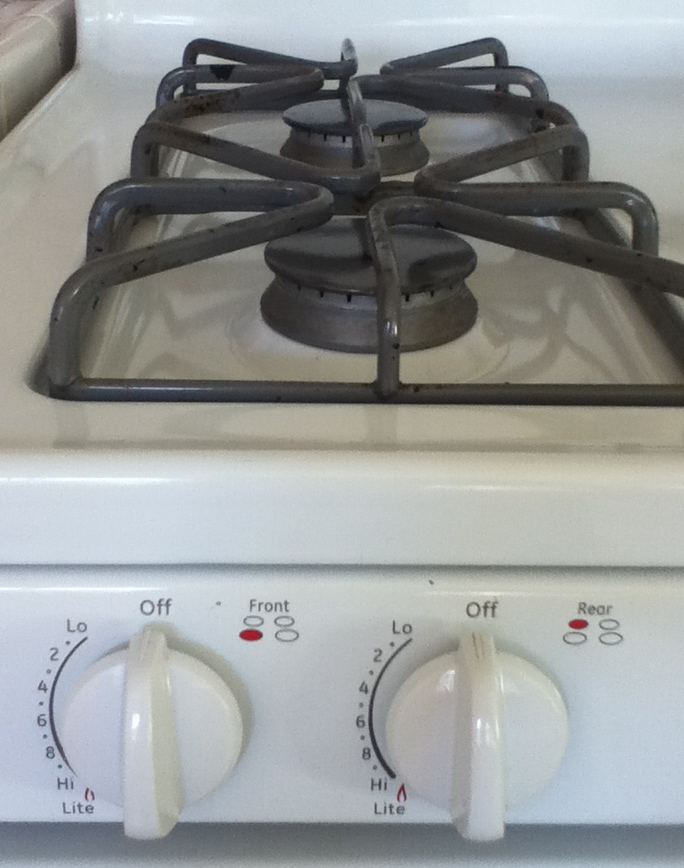
This is a standard piece of equipment and a standard user interface solution. Well – nothing less annoying. The flaw here is almost the same as in the case of the dual compartment above. There are two knobs, one for each burner. Unfortunately the burners are aligned vertically, while the knobs are aligned horizontally, giving you no clue (without taking a closer look) which knob is for which burner.
In order to tell which knob is for which burner, I have to bend. Often I don’t want to bend, I just want to turn the burner on. When I don’t bend and look at the pictures which decipher the knob-to-burner assignment, I always choose the wrong knob and turn the wrong burner on. Like in the dual compartment case, it is not possible to memorize which knob is for which burner. Maybe because the pair of knobs on the other side for the two remaining burners is swapped. Well, at least they left a visual clue for the people who are not too lazy and actually bend or take a step back to determine which knob to turn. Please note, that when you’re close to the stove and e.g. putting a kettle on the back burner, you don’t see the icons over the knobs and you either have to bend down or back or you have to take a step back.
As innocuous as they may seem, these can be quite annoying.
How many broken UI designs can you spot around you?
Mutex vs. binary semaphore
Mutices and semaphores are among the most basic tools in multithreaded programming. However most people I asked do not know what is the difference between them. So please let me introduce you to them.
Consider a resource which is shared between multiple threads. For example a container. You don’t want to have multiple threads modifying the container simultaneously, or one thread modifying the container while other threads are reading from it, otherwise you will end up with classical race conditions and unpredictable things will happen.
To guard a resource from other threads while you are accessing it, you use a synchronization primitive, which you conceptually associate with the guarded resource. Threads can lock the synchronization primitive when they need to access the resource. Then they can release the primitive after they are finished with accessing the resource. When the synchronization primitive is already locked, a thread trying to lock it will wait/stall until the other thread who locked it – unlocks it.
At the first glance, both mutex and binary semaphore fit the description of the above synchronization primitive. Well, not quite. Using binary semaphore in place of a mutex is a bad idea.
Conceptually a semaphore is like an integer. You can increment it and you can decrement it. If the semaphore’s value is 0, the thread trying to decrement it will wait/stall until somebody else increments it. This way, the semaphore never has a negative value.
A binary semaphore is just a semaphore capped at one, i.e. it’s value cannot exceed one. You can treat the decrement operation as “lock” and the increment operation as “unlock”.
The problem with the semaphore is that any thread can increment it or decrement it. In particular, if the semaphore’s value is 0 (“locked”), another thread can increment it (“unlock”), even if this is not the thread which locked it! It takes more discipline to write code which correctly uses binary semaphores for locking and there is still a potential for error.
Another problem is that most semaphore implementations allow sharing semaphores between processes. This makes them much heavier than e.g. POSIX mutices or critical sections on Windows, which are lightweight, because they only work within one process and don’t require calling into kernel space in most cases.
Unlike binary semaphores,mutices may also have another interesting property, depending on an implementation, i.e. they can be recursive. A recursive mutex can be locked twice from the same thread. This allows you to write an accessor function and not have to care whether the mutex is already locked by the current thread or not. However it is generally not recommended to use recursive mutices, the necessity for recursive mutices is a sign of a bad design and indicates that there may be potential problems with the interfaces or even hidden multithreading bugs.
In general mutices (or critical sections on Windows) are typically recommended over binary semaphores as synchronization primitives between multiple threads in the same process.
 Chris Dragan's Corner